
Website Capture quick start
Build a URL list, choose concurrency, and capture several public pages as one run.
Updated August 10, 2026
On this page
Website Capture opens pages in managed browsers and saves one frame per URL. Open it from the sidebar or press Command + 2.
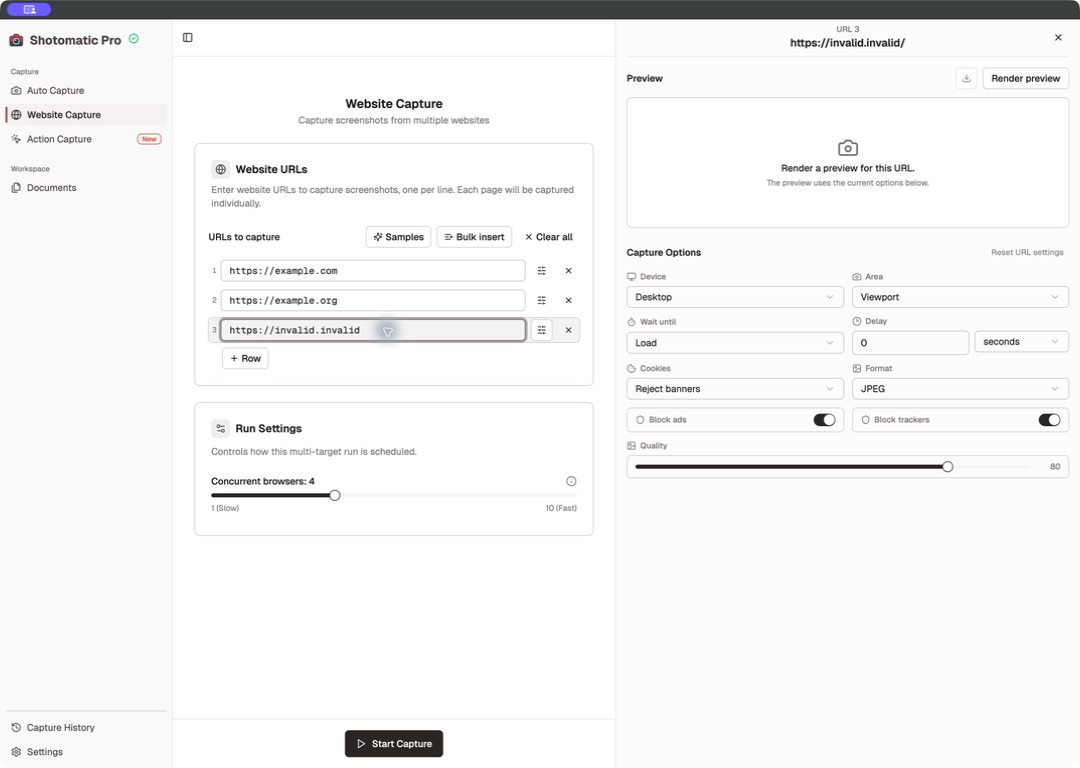
Add and manage URLs
- Enter a URL in a row and press Enter to insert another row below it.
- Select Row to add an empty row.
- Select Samples to load public examples.
- Select Bulk insert to paste several URLs at once.
- Remove one row with its remove control, or select Clear all to empty the list.
Shotomatic adds https:// to bare domains and accepts only HTTP or HTTPS URLs.
Configure one URL
Open a row's settings to change only that page. You can render a preview, inspect it at a larger size, download it, or reset the row.
See Website Capture options for every page setting.
Choose concurrency
Under Run Settings, set concurrency from 1 through 10; the default is 4. Higher values can finish sooner but use more memory and CPU. Shotomatic can show resource guidance when the system is under load.
URL inputs, options, and concurrency are locked while a run is active.
Prepare browser components
Shotomatic may download browser components when Website Capture needs them. It shows the percentage while the download runs. Keep the app open until setup finishes. If setup fails, follow the message shown in the app.
Start the run
Select Start Capture. Use page-level Cancel or Retry controls while the batch runs, or stop the whole batch. Completed work is saved in Capture History.
Continue with run states, cancellation, retry, and results.