
Website Capture options
Set viewport, page area, wait conditions, cookies, image format, blocking, and preview for one URL.
Updated July 20, 2026
Each URL can override the run defaults. Open the row's settings to edit and preview that page.
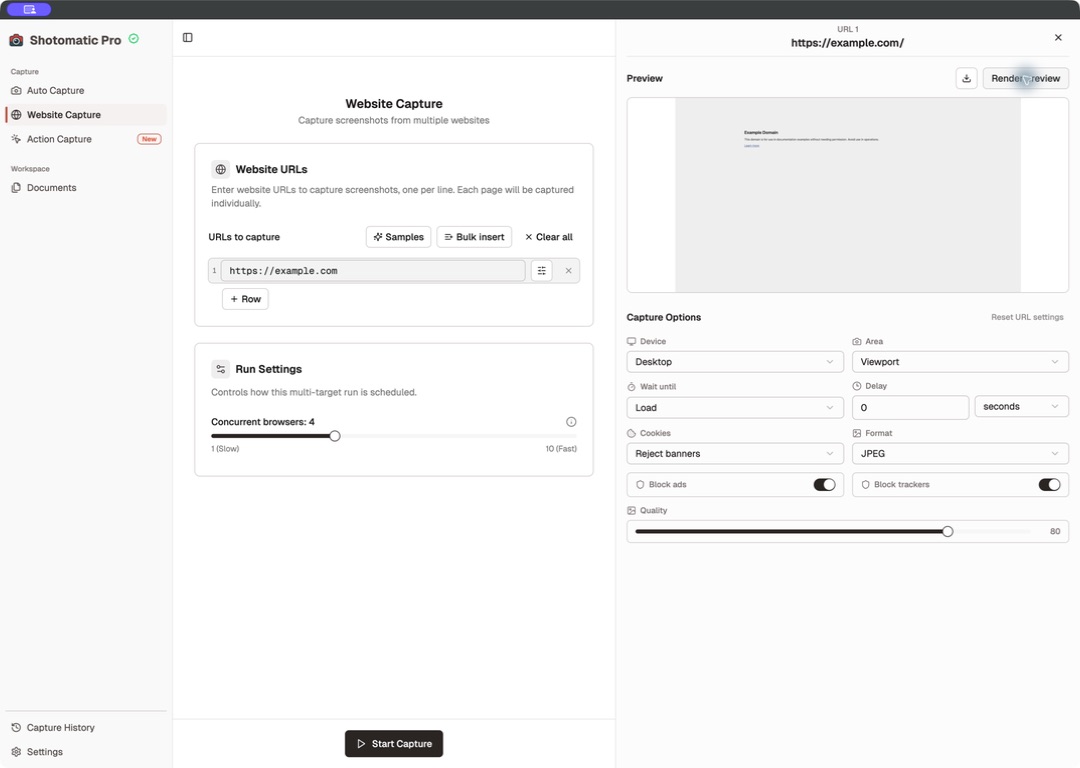
Device and area
| Device | Viewport |
|---|---|
| Desktop | 1920 × 1080 |
| Tablet | 768 × 1024 |
| Mobile | 390 × 844 |
Viewport captures the visible browser area. Full page captures the full scrollable document.
Wait and delay
Choose the browser event that must finish before capture:
- Load: the standard page load event; this is the default.
- DOM content loaded: the initial document is ready.
- Network idle: background requests have settled.
Add a delay from 0 to 60 seconds when content appears after the selected event. The input supports milliseconds or seconds.
Cookie banners
Choose Reject banners, Accept minimal, Hide only, or Leave unchanged. Handling is best effort; a custom consent system may still appear.
Format and quality
Website Capture supports JPEG, PNG, and WebP. JPEG is the default. Quality ranges from 1 through 100 and applies to JPEG and WebP; PNG is lossless and ignores the quality value.
Ads and trackers
Block ads and Block trackers are enabled by default. Disable a blocker when the page depends on a resource it removes or when the captured page must match an unblocked browser.
Preview
Select Render preview after changing settings. Shotomatic marks the preview Out of date when the current controls no longer match it.
- Double-click the preview to inspect it at a larger size.
- Download the preview when you want to keep the rendered check.
- Reset URL settings removes the row overrides.