Free Snagit Alternatives for Windows (2026)
No single free app replaces all of Snagit. See which free Windows tools cover screenshots, scrolling capture, annotation, and screen recording.

Snagit does a lot in one app: screenshots, scrolling capture, a detailed editor, screen recording, and templates for consistent images. No free Windows app does all of that. You can replace most of it for free by picking the tool that matches the job you use Snagit for.
This guide lists what Snagit does, maps each job to free Windows tools, and says where paying for a tool still makes sense.
What Snagit does
Snagit from TechSmith runs on Windows and Mac. Its official page lists scrolling capture for long pages and documents, screen recording with microphone, system audio, and webcam saved as MP4, and stamps, templates, and themes that apply a team's colors and fonts to every capture. It's a paid app.
Before you switch, list which of those you actually use. Most people use one or two of them, and a free tool usually covers those well.
Free Snagit alternatives at a glance
| Snagit job | Free Windows tools | What you give up |
|---|---|---|
| Screenshots with annotation | ShareX, Flameshot, Greenshot, PicPick (personal use), Snipping Tool | Snagit's stamps, templates, and themes |
| Scrolling capture | ShareX, PicPick (personal use) | One tool for both long pages and app windows |
| Screen recording | ShareX (video or GIF), Snipping Tool (short videos), OBS Studio | Recording and image editing in the same app |
| Text from a screenshot (OCR) | ShareX, Snipping Tool | Little; both run OCR without extra software |
| Step-by-step guides from clicks | No free match; Shotomatic Action Capture is paid | Free tools capture one step at a time |
The table compares what each tool is built to do. Plans change, so check each product's site before you rely on a free tier.
ShareX: screenshots, scrolling capture, and recording
ShareX is free and open source. It captures the full screen, a window, or a region, and it has scrolling capture and screen recording as video or GIF. Its editor adds arrows, numbered steps, blur, pixelate, highlight, and text, and text recognition is built in.
ShareX also runs after-capture tasks: it can copy, save, upload, or run OCR on every capture automatically. That covers much of Snagit's workflow, but the settings window is dense and takes time to learn. If you mostly grab and mark up screenshots, a simpler tool below may suit you better.
Flameshot and Greenshot: quick capture and annotation
Flameshot is free and open source for Windows, Mac, and Linux. You select an area and annotate it on the spot with arrows, highlights, blur or pixelate, text, shapes, and numbered counters. It's a good fit if you want Snagit-style markup on quick captures without a large settings menu.
Greenshot is free and open source for Windows. It captures a region, a window, or the full screen, opens a light editor for notes, highlights, and hiding parts of the image, and sends the result to a file, the clipboard, a printer, an email, or an Office program. Its scrolling capture only works with Internet Explorer pages.
PicPick: a Snagit-style editor for personal use
PicPick is a Windows app with scrolling capture for long pages and logs, a ribbon-style editor with text, arrows, shapes, callouts, blur, and mosaic, plus a color picker and a pixel ruler. Its site says it's free for personal, non-commercial use, and business use needs a license. If you're replacing Snagit at work, budget for that license or pick one of the open-source tools.
Snipping Tool and OBS Studio: built-in capture and free recording
Snipping Tool comes with Windows 11. Per Microsoft's Snipping Tool guide, it captures a rectangle, a window, the full screen, or a freeform shape, records short screen videos, and pulls text out of a capture. It has no scrolling capture. Our Snipping Tool alternatives guide covers when it's enough on its own.
For longer recordings, OBS Studio is free and open-source software for video recording and live streaming on Windows 10 and 11. You add window or screen captures as sources and record. It's more setup than Snagit's recorder, and it doesn't edit screenshots, so pair it with one of the tools above.
For a long web page, you don't need any of these: your browser can save a full-page screenshot. Our guide to scrolling screenshots on Windows shows the steps for Edge, Chrome, and Firefox.
When paying makes sense: Shotomatic
Some Snagit users mainly make step-by-step guides or capture the same screen over and over. Free screenshot tools handle those one capture at a time, which gets slow after a few dozen steps. Shotomatic runs on Windows 10 and 11 and is built for that kind of work. It's free to download, with paid plans for full use.
- Action Capture saves a screenshot each time you click and arranges the steps into a guide you can trim, annotate, and export as PDF, PNG, JPG, WebP, or ZIP. See how Action Capture turns clicks into a guide.
- Auto Capture saves a screen, a window, or a custom area at an interval until it reaches a screenshot count, a duration, or an end time. See screenshot automation on Windows.
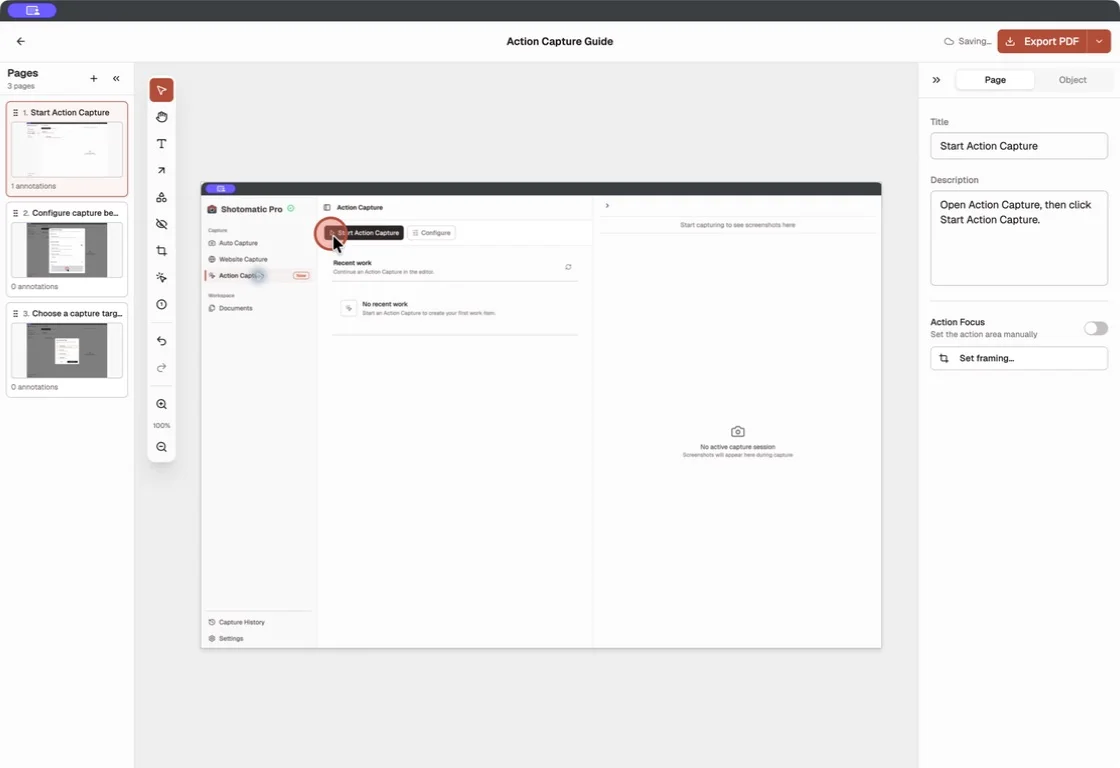
Shotomatic doesn't replace Snagit's webcam recording, templates, or scrolling capture of app windows. If those are what you use Snagit for, the free tools above or Snagit itself fit better.
Which free Snagit alternative should you use?
- Screenshots with lots of markup and automation: ShareX.
- Quick annotated captures with little setup: Flameshot, or Greenshot if you send captures to Office apps.
- A ribbon editor like Snagit's, at home: PicPick, which needs a license for work.
- Occasional snips and short videos: Snipping Tool.
- Long screen recordings: OBS Studio.
- Step-by-step guides from clicks, or repeated captures: Shotomatic, which is paid.
Frequently Asked Questions
Turn your clicks into a clear step-by-step guide
Action Capture records each click as an ordered step, then lets you edit and export the guide.
Related posts
See more postsSnipping Tool Alternatives for Windows (2026)
What Snipping Tool already does on Windows 11, where it stops, and when ShareX, Greenshot, Snagit, or Shotomatic is the better screen capture tool.

Best Snagit Alternatives for Mac in 2026
Compare Snagit alternatives for Mac by screenshot automation, step capture, annotation, sharing, platform support, and file export.

How to Take a Scrolling Screenshot on Windows
Snipping Tool can't take a scrolling screenshot. Save a whole web page from Edge, Chrome, or Firefox, or stitch overlapping captures of any app window.

Windows Steps Recorder Alternatives for Windows 11 (2026)
Steps Recorder is deprecated in Windows 11. Compare Microsoft's video replacements with click-based tools that still turn each step into a screenshot.
