Visual Guide Tools for Mac: Compare Four Workflows
Compare Mac visual guide tools for click capture, editing, privacy, sharing, and export, including Shotomatic, Folge, Scribe, and built-in tools.

The right visual documentation tool for Mac depends on the result you need. Shotomatic and Folge focus on desktop capture and file-based guides. Scribe connects captured guides to an online workspace and sharing system. macOS built-in tools create screenshots or video but do not assemble click-driven steps. The practical differences are capture scope, editing, output, storage, and sharing.
TL;DR: Choose Shotomatic for a focused local Mac capture-to-document workflow, Folge for a local cross-platform editor with a wide export set, Scribe for hosted sharing and collaboration, or macOS Screenshot when a few manual images or a video are enough.
What a step recorder should produce
A useful step recorder lets the author remove incidental input and keep the actions a reader needs. Look for an ordered sequence, visible action locations, editable instructions, privacy controls, and a delivery format that fits the reader.
Before comparing apps, decide whether you need:
- desktop apps, browser workflows, or both
- local files or hosted links and embeds
- short image guides or long formatted documents
- individual editing or team collaboration
- offline use, printing, or online search
- cross-platform authoring or Mac-only focus
Mac visual guide tools at a glance
| Option | Capture model | Editing and output | Best fit |
|---|---|---|---|
| macOS Screenshot | Manual stills or continuous video | Individual images, Markup, or MOV | A few frames or a motion-based demonstration |
| Shotomatic Action Capture | Target state before each accepted click on Mac | Ordered local document; PDF, PNG, JPG, WebP, and ZIP on Free and Pro | Focused local Mac guides, support steps, SOPs, and evidence |
| Folge | Click or hotkey capture on Mac and Windows | Local editor with annotations and PDF, Word, PowerPoint, HTML, Markdown, JSON, GIF, SCORM, and image exports | Cross-platform local documentation and format-heavy handoff |
| Scribe | Browser capture on all plans; desktop capture on Pro and Enterprise | Hosted guide editing, sharing, embeds, and plan-dependent exports | Teams that want online distribution and collaboration |
The table describes the current product model, not a universal ranking. Plan packaging and integrations can change, so verify official documentation before purchase or rollout.
Use macOS Screenshot for a few frames or video
The built-in Screenshot app is the simplest route when you need a few selected images or a continuous recording. Apple documents full-screen, window, selected-area, and screen-recording options in its Mac screenshot guide.
The limitation is assembly. The built-in tool does not watch clicks and turn them into an editable list of steps with titles and descriptions.
Use Shotomatic for a focused local Mac workflow
Shotomatic Action Capture saves the target state immediately before each accepted click, marks the click location, and opens the sequence in a document editor. The workflow stays inside a Mac desktop app until the user chooses an export destination.
Free supports 5 saved steps per session and unlimited saved guides. It includes page organization, Text, shapes, Line, Arrow, Framing, Action Focus, undo and redo, plus PDF, PNG, JPG, WebP, and ZIP export. Shotomatic saves the fifth step before pausing. The user can open the current document or activate Pro and continue the same session.
Pro removes the session step limit and adds Blur, Click Marker, and Step Numbers. See Action Capture and the current plan details.
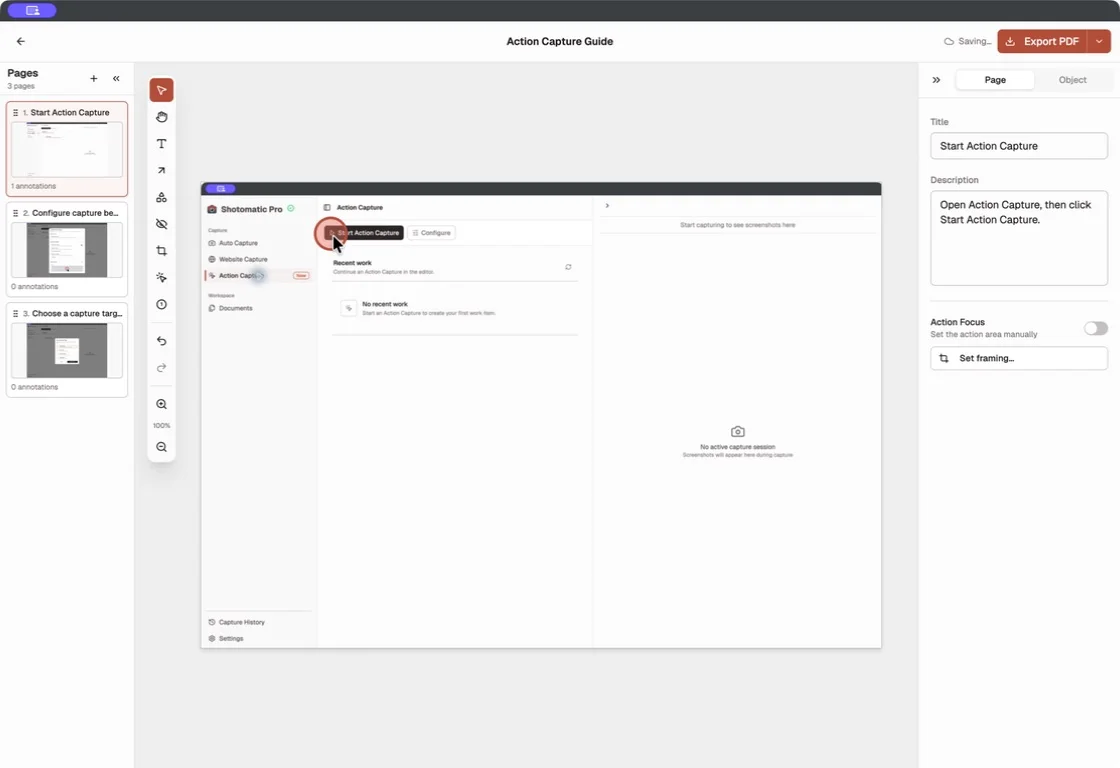
Shotomatic fits a reader who wants local Mac capture, sequence cleanup, image output, or a PDF without moving the guide into a hosted documentation workspace.
Use Folge for local cross-platform documentation
Folge captures active windows, full screens, or selected regions on Mac and Windows. Its current getting-started guide documents click capture, titles and descriptions, reordering, annotations, and export.
Folge lists PDF, Word, PowerPoint, HTML, Markdown, JSON, image output, animated GIF, SCORM, and integrations among its current routes. Its annotation documentation includes shapes, arrows, text, tooltips, blur, highlight, magnification, spotlight, OCR, and crop.
Folge fits a reader who wants local cross-platform capture and editing, nested or formatted guide structures, and several handoff formats. Folge also documents optional online-guide and integration routes, so teams should check which output path matches their storage policy.
Use Scribe for hosted sharing and collaboration
Scribe generates screenshot-based guides from browser or desktop capture and connects them to a Workspace. Its new-user guide documents title and description editing, step editing, sharing, embeds, and Pages.
Scribe's desktop capture documentation says desktop apps are available on Pro and Enterprise. Basic uses the Chrome or Edge browser extension for browser workflows.
Scribe fits teams that want hosted links, embeds, document permissions, and collaboration inside the same service. Its sharing documentation covers private, team, invited-person, organization, and anyone-with-link access.
We did not test the Scribe desktop app because desktop capture was not available for this comparison without starting a paid plan. The description above is limited to official public documentation and does not rate Scribe's desktop speed or ease of use.
Choose by capture, storage, and delivery
Choose macOS Screenshot when the task needs a few deliberate frames or video and you are comfortable assembling any written guide yourself.
Choose Shotomatic when the author works on Mac, wants a focused local click-to-document workflow, and needs reviewed image or document files.
Choose Folge when local cross-platform work, extensive annotations, structured guides, and a wide range of export formats are central requirements.
Choose Scribe when hosted sharing, embeds, team access, and centralized online guide management matter more than keeping the entire guide as a local desktop document.
For the Microsoft replacement decision, see Microsoft Steps Recorder Alternative for Mac. For the capture and editing workflow, use How to Create a Step-by-Step Guide from Clicks on Mac. Review the broader Shotomatic feature set before choosing a plan.
Frequently Asked Questions
Related posts
See more postsMicrosoft Steps Recorder Alternative for Mac (2026)
Need Steps Recorder on a Mac? Compare click capture with screen recording, then choose the right workflow for image, PDF, or video instructions.

How to Create a Step-by-Step Guide from Clicks on Mac
Create a step-by-step guide on Mac by capturing meaningful clicks, marking each action, editing the steps, and exporting images or a PDF.

Step-by-Step Guide vs Screen Recording: Which Should You Use?
Choose between a screenshot guide and screen recording for tutorials, support, and documentation based on motion, audio, editing, and reader needs.
Local vs Cloud Process Documentation Tools
Choose a local or cloud process documentation tool based on capture, storage, privacy, collaboration, offline access, sharing, and administration.

Turn your clicks into a clear step-by-step guide
Action Capture records each click as an ordered step, then lets you edit and export the guide on your Mac.